Chapter 7.1 - The `<iframe>` Element
Complete HTML reference for the iframe element, including syntax, security, accessibility, SEO, browser behavior, JavaScript integration, and production best practices.
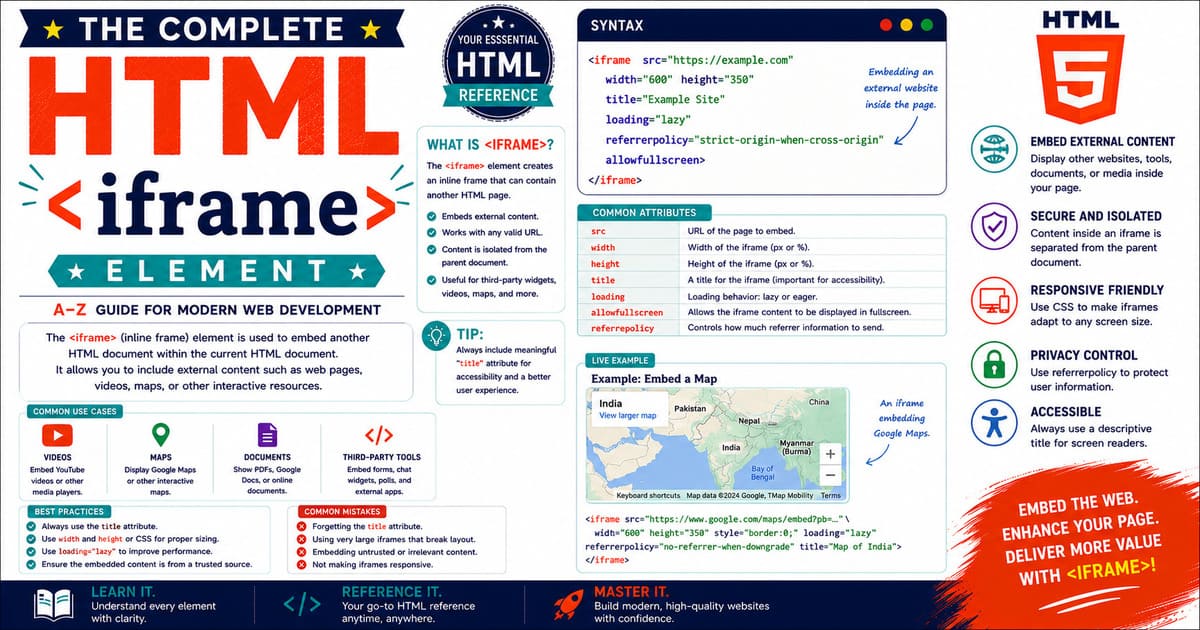
Chapter 7 — Embedded Content
7.1 The <iframe> Element
The <iframe> (Inline Frame) element allows one HTML document to be embedded inside another HTML document. It is one of the most powerful embedded content elements in HTML and is widely used to display external webpages, videos, maps, documents, dashboards, advertisements, payment forms, and other web applications.
Unlike hyperlinks that navigate users away from the current page, an <iframe> displays another page directly within the current document.
Today, almost every major website uses iframes in some form.
Examples include:
- YouTube video embeds
- Google Maps
- Online payment gateways
- Social media widgets
- Interactive dashboards
- PDF viewers
- Documentation portals
- Customer support chat widgets
Although extremely useful, iframes also introduce important security, privacy, accessibility, and performance considerations that every web developer should understand.
Why the <iframe> Element Exists
Before iframes were introduced, developers often had to redirect users to another page or open new browser windows to display external content.
The <iframe> element solved this problem by allowing multiple independent documents to appear within a single webpage.
Each embedded document behaves as its own browsing context with its own HTML, CSS, JavaScript, cookies, and navigation history (subject to browser security policies).
HTML Living Standard Definition
According to the HTML Living Standard, the <iframe> element represents a nested browsing context embedded within another document.
Each iframe creates an independent environment capable of displaying another HTML document.
This embedded document can originate from:
- The same website
- A different website
- A local HTML file
- A web application
- A generated document
Browser security policies determine which interactions are permitted between the parent page and the embedded page.
Basic Syntax
The simplest iframe contains only the src attribute.
1
<iframe src="about.html"></iframe>
When the browser loads the page, it requests the document specified by the src attribute and displays it inside the frame.
A Practical Example
1
2
3
4
5
<iframe
    src="contact.html"
    width="600"
    height="400">
</iframe>
The browser creates an area measuring 600 × 400 pixels and loads the contact.html page inside it.
Visual Representation
1
2
3
4
5
6
7
8
9
10
11
12
13
14
+------------------------------------------------------+
| Parent HTML Page                                     |
|                                                      |
|  Heading                                             |
|                                                      |
|  +----------------------------------------------+    |
|  | Embedded HTML Document (iframe)              |    |
|  |                                              |    |
|  | Independent webpage                          |    |
|  |                                              |    |
|  +----------------------------------------------+    |
|                                                      |
| Footer                                               |
+------------------------------------------------------+
The embedded page behaves independently while remaining visually contained within the parent page.
Parent and Child Relationship
The parent page hosts the iframe.
The iframe loads another document.
1
2
3
4
5
6
7
8
Parent Page
      │
      │
      ▼
<iframe>
      │
      ▼
Embedded HTML Document
Each document maintains its own DOM, CSS rules, JavaScript execution context, and navigation state.
Content Model
Unlike many HTML elements, the <iframe> element is not a void element.
It requires both an opening and a closing tag.
Correct:
1
<iframe src="https://example.com/lesson.html"></iframe>
Incorrect:
1
<iframe src="https://example.com/lesson.html">
Although browsers often recover from missing closing tags, valid HTML should always include the closing </iframe> tag.
Default Browser Appearance
Most browsers display an iframe with a border by default (although browser styles may vary).
Developers frequently customize its appearance using CSS.
Example:
1
2
3
4
iframe {
    border: none;
    width: 100%;
}
This creates a cleaner appearance for embedded content.
Common Use Cases
The <iframe> element is commonly used for:
- Embedding YouTube videos
- Displaying Google Maps
- Showing PDF documents
- Integrating payment gateways
- Embedding customer support chat
- Displaying online forms
- Showing dashboards
- Embedding documentation
- Displaying external applications
Its versatility makes it one of the most frequently used embedded content elements.
Advantages
Using an iframe provides several benefits:
- Embeds external applications easily.
- Keeps users on the current page.
- Separates embedded content from the parent document.
- Supports independent scrolling.
- Simplifies third-party integrations.
- Widely supported across browsers.
Limitations
Despite its advantages, iframes have important limitations.
- Additional HTTP requests
- Increased memory usage
- Possible performance impact
- Cross-origin security restrictions
- SEO limitations for embedded content
- Accessibility considerations
Understanding these limitations helps developers decide when an iframe is the appropriate solution.
Practical Example
Imagine an online learning platform.
A lesson page contains:
- Course description
- Navigation
- Notes
- Exercises
Instead of opening a new page for each demonstration, an iframe displays interactive coding examples directly within the lesson.
Students can experiment while remaining on the same page.
Pro Tip
Treat an iframe as an independent browser window embedded inside another webpage. It has its own document, history, scripts, and rendering process, even though it appears as part of the parent page.
Common Mistakes
Mistake 1
Embedding websites that explicitly prevent iframe embedding.
Mistake 2
Using fixed widths that break responsive layouts.
Mistake 3
Ignoring security restrictions.
Mistake 4
Embedding too many iframes on a single page.
Mistake 5
Forgetting to provide a meaningful title attribute for accessibility.
Accessibility Note
Every iframe should include a descriptive title attribute.
Example:
1
2
3
4
<iframe
    src="campus-map.html"
    title="Interactive Campus Map">
</iframe>
Screen readers use the title to identify the purpose of the embedded content.
SEO Note
Search engines primarily index the parent page and the embedded page separately. Important content should exist within your own page rather than relying entirely on embedded external documents.
Summary
In this introductory section, you learned:
- What an iframe is.
- Why it exists.
- How browsers process embedded documents.
- Advantages and limitations.
- Common production use cases.
- Accessibility and SEO fundamentals.
Coming Up Next — Section 7.1.2
The next section explores:
- Complete attribute reference
- Global attributes
- Sandbox attribute
- Loading attribute
- Referrer Policy
- Permissions Policy
- DOM interface
- Browser behavior
7.1.2 Complete Attribute Reference of the <iframe> Element
The <iframe> element provides several attributes that control:
- The embedded document source
- Size and appearance
- Security restrictions
- Loading behavior
- Privacy settings
- Permissions
- Browser communication
Understanding these attributes is essential for building secure and professional embedded content.
Attribute Overview
| Attribute | Purpose | Required |
|---|---|---|
src | URL of the embedded document | No |
srcdoc | Inline HTML content inside iframe | No |
name | Browsing context name | No |
width | Display width | No |
height | Display height | No |
title | Accessibility description | Recommended |
loading | Loading behavior | No |
sandbox | Security restrictions | No |
allow | Permissions policy | No |
allowfullscreen | Enables fullscreen mode | No |
referrerpolicy | Controls referrer information | No |
The src Attribute
The src attribute specifies the document to embed.
Example:
1
2
3
<iframe
    src="https://example.com">
</iframe>
The browser sends a request to the specified URL and displays the returned document inside the iframe.
Common sources include:
- HTML pages
- Videos
- Maps
- Documents
- Applications
- Dashboards
External Website Example
1
2
3
4
<iframe
    src="https://example.com"
    title="Example Website">
</iframe>
The iframe loads content from another origin.
However, the embedded website must permit iframe usage.
Many modern websites prevent embedding for security reasons.
The srcdoc Attribute
The srcdoc attribute allows HTML content to be written directly inside the iframe.
Example:
1
2
3
4
5
6
<iframe
    srcdoc="
    <h1>Hello World</h1>
    <p>This content is inside the iframe.</p>
    ">
</iframe>
The browser displays the provided HTML instead of loading an external URL.
src vs srcdoc
| Attribute | Purpose |
|---|---|
src | Loads an external document |
srcdoc | Provides inline HTML |
If both are present, srcdoc takes priority.
Example:
1
2
3
4
<iframe
    src="page.html"
    srcdoc="<h1>Welcome</h1>">
</iframe>
The browser displays:
1
Welcome
instead of loading:
1
page.html
The name Attribute
The name attribute assigns a browsing context name.
Example:
1
2
3
<iframe
    name="lessonFrame">
</iframe>
This name can be used as a target for links.
Example:
1
2
3
4
5
<a
href="chapter2.html"
target="lessonFrame">
Open Lesson
</a>
The linked page opens inside the iframe.
The width Attribute
The width attribute defines the iframe width.
Example:
1
2
3
4
<iframe
    src="video.html"
    width="800">
</iframe>
The value is usually measured in CSS pixels.
However, modern responsive design usually prefers CSS instead of fixed HTML dimensions.
The height Attribute
The height attribute defines the iframe height.
Example:
1
2
3
4
<iframe
    src="map.html"
    height="500">
</iframe>
Like width, CSS is often preferred for responsive layouts.
Responsive Example
Instead of:
1
2
3
4
<iframe
    width="800"
    height="450">
</iframe>
Modern development uses CSS:
1
2
3
4
5
6
7
8
9
iframe {

    width: 100%;

    height: 450px;

    border: none;

}
This adapts better to different screen sizes.
The title Attribute
The title attribute provides an accessible description.
Example:
1
2
3
4
<iframe
    src="map.html"
    title="Interactive City Map">
</iframe>
Screen readers announce this information to users.
A meaningful title is strongly recommended for every iframe.
The loading Attribute
The loading attribute controls when the iframe is loaded.
Available values:
1
2
eager
lazy
Eager Loading
The browser loads the iframe immediately.
Example:
1
2
3
4
<iframe
    src="important.html"
    loading="eager">
</iframe>
Useful for content visible immediately.
Lazy Loading
The browser delays loading until the iframe is close to the viewport.
Example:
1
2
3
4
<iframe
    src="video.html"
    loading="lazy">
</iframe>
Advantages:
- Faster initial page loading
- Reduced network usage
- Better performance
The sandbox Attribute
The sandbox attribute applies security restrictions to the embedded document.
Example:
1
2
3
4
<iframe
    src="external.html"
    sandbox>
</iframe>
Without values, sandbox applies maximum restrictions.
The embedded page:
- Cannot run scripts.
- Cannot submit forms.
- Cannot open new windows.
- Cannot access certain browser features.
Sandbox Permissions
Specific capabilities can be enabled.
Example:
1
2
3
4
<iframe
    src="app.html"
    sandbox="allow-scripts allow-forms">
</iframe>
This allows:
- JavaScript execution
- Form submission
while maintaining other restrictions.
Common Sandbox Values
| Value | Allows |
|---|---|
allow-scripts | JavaScript execution |
allow-forms | Form submission |
allow-popups | Opening new windows |
allow-downloads | Downloads |
allow-modals | Dialog boxes |
allow-same-origin | Original origin access |
allow-presentation | Presentation mode |
Security Warning
Using:
1
sandbox="allow-scripts allow-same-origin"
requires careful consideration.
For same-origin content, combining these permissions may reduce sandbox protection.
Security decisions should always consider the trust level of the embedded content.
The allow Attribute
The allow attribute controls browser features available to the iframe.
Example:
1
2
3
4
<iframe
    src="camera.html"
    allow="camera; microphone">
</iframe>
Possible permissions include:
- Camera
- Microphone
- Geolocation
- Fullscreen
- Payment
- Clipboard access
The allowfullscreen Attribute
The allowfullscreen attribute allows embedded content to enter fullscreen mode.
Example:
1
2
3
4
<iframe
    src="video.html"
    allowfullscreen>
</iframe>
Commonly used for:
- YouTube videos
- Video players
- Presentations
The referrerpolicy Attribute
The referrerpolicy attribute controls referrer information sent when loading the iframe.
Example:
1
2
3
4
<iframe
    src="https://example.com"
    referrerpolicy="no-referrer">
</iframe>
Common values:
no-referreroriginsame-originstrict-originstrict-origin-when-cross-origin
Global Attributes
The <iframe> element supports standard HTML global attributes.
Examples:
1
2
3
4
5
<iframe
    id="videoFrame"
    class="embedded-video"
    title="Tutorial Video">
</iframe>
Supported attributes include:
idclassstylehiddenlangdirdata-*
Event Attributes
The iframe element supports standard events.
Examples:
loaderror
Example:
1
2
3
4
<iframe
    src="page.html"
    onload="console.log('Loaded')">
</iframe>
Modern practice prefers JavaScript event listeners:
1
2
3
4
5
6
7
8
9
10
const frame =
document.querySelector("iframe");

frame.addEventListener(
"load",
function(){

console.log("Iframe loaded");

});
Pro Tip
Always add a meaningful title attribute and use loading="lazy" for non-critical iframes. These two small improvements significantly improve accessibility and page performance.
Common Mistakes
Mistake 1
Embedding untrusted websites without sandbox protection.
Mistake 2
Loading many heavy iframes on the initial page.
Mistake 3
Using fixed dimensions that break mobile layouts.
Mistake 4
Forgetting the iframe accessibility title.
Mistake 5
Granting unnecessary permissions through the allow attribute.
Accessibility Note
Every iframe should identify its purpose through the title attribute.
Avoid:
1
title="frame"
Prefer:
1
title="Monthly Sales Dashboard"
Users should immediately understand what content is embedded.
SEO Note
Important information should not exist only inside an iframe. Search engines may treat embedded content separately from the main page.
Keep essential content in your own HTML whenever possible.
Summary
In this section, you learned:
- Every major iframe attribute.
- Loading behavior.
- Security controls.
- Sandbox restrictions.
- Permissions.
- Privacy controls.
- Accessibility requirements.
- Responsive design considerations.
Coming Up Next — Section 7.1.3
The next section will cover:
- iframe security model
- Same-Origin Policy
- Cross-Origin Communication
postMessage()API- Sandbox security strategies
- Permissions Policy
- Real-world security examples
7.1.3 <iframe> Security Model, Same-Origin Policy, Cross-Origin Communication, and Secure Embedding
The <iframe> element is extremely powerful because it allows one webpage to display another webpage inside it.
However, this capability introduces important security challenges.
An embedded document can contain:
- JavaScript code
- Forms
- Cookies
- User information
- External resources
- Authentication sessions
Without proper restrictions, malicious websites could misuse iframes to attack users.
For this reason, modern browsers implement several security mechanisms:
- Same-Origin Policy
- Sandbox restrictions
- Permissions Policy
- Content Security Policy
- Cross-origin communication controls
Understanding these concepts is essential for every professional web developer.
The Same-Origin Policy
The Same-Origin Policy (SOP) is one of the fundamental security mechanisms of web browsers.
It prevents one website from freely accessing sensitive information from another website.
An origin consists of:
1
scheme + domain + port
Example:
1
https://example.com:443
contains:
- Scheme:
https - Domain:
example.com - Port:
443
Same-Origin Example
Suppose this page:
1
https://mywebsite.com
embeds:
1
https://mywebsite.com/profile.html
Both documents have the same origin.
JavaScript interaction is generally allowed.
Cross-Origin Example
Parent page:
1
https://website-a.com
Embedded page:
1
https://website-b.com
These are different origins.
The browser blocks direct access between them.
Why Same-Origin Policy Exists
Without this protection, a malicious website could:
- Open your banking website inside an iframe.
- Read private account information.
- Steal sensitive data.
- Perform actions without permission.
The Same-Origin Policy prevents these attacks.
Same-Origin Communication Example
Same-origin iframe:
1
2
3
4
<iframe
    id="dashboard"
    src="/dashboard.html">
</iframe>
JavaScript:
1
2
3
4
5
const frame =
document.getElementById("dashboard");

const documentInsideFrame =
frame.contentDocument;
Because both documents share the same origin, access is permitted.
Cross-Origin Access Restriction
Example:
1
2
3
<iframe
    src="https://external-site.com">
</iframe>
JavaScript:
1
2
3
4
const frame =
document.querySelector("iframe");

frame.contentDocument;
The browser blocks access.
Typical error:
1
Blocked a frame with origin from accessing a cross-origin frame.
This protection is automatic.
The window.postMessage() API
When communication between different origins is required, browsers provide the postMessage() API.
It allows controlled communication between:
- Parent page
- Embedded iframe
- Popup windows
Basic postMessage Example
Parent page:
1
2
3
4
5
6
7
const frame =
document.querySelector("iframe");

frame.contentWindow.postMessage(
    "Hello iframe",
    "https://example.com"
);
The parent sends a message to the iframe.
Receiving Messages Inside iframe
The embedded page listens for messages:
1
2
3
4
5
6
7
window.addEventListener(
"message",
function(event){

    console.log(event.data);

});
The iframe receives:
1
Hello iframe
Security with postMessage
Never trust every incoming message.
Bad example:
1
2
3
4
5
6
7
window.addEventListener(
"message",
event => {

console.log(event.data);

});
Any website could send data.
Secure postMessage Example
1
2
3
4
5
6
7
8
9
10
11
12
13
window.addEventListener(
"message",
function(event){

if(event.origin !== "https://trusted-site.com"){

return;

}

console.log(event.data);

});
Always verify:
event.origin- Expected message format
- Allowed actions
The sandbox Security Model
The sandbox attribute is one of the most important iframe security features.
Example:
1
2
3
4
<iframe
src="external.html"
sandbox>
</iframe>
A sandboxed iframe receives strict restrictions.
By default, it loses permissions such as:
- JavaScript execution
- Form submission
- Popup creation
- Top-level navigation
- Access to certain browser APIs
Adding Specific Permissions
Developers can selectively enable features.
Example:
1
2
3
4
<iframe
src="application.html"
sandbox="allow-scripts allow-forms">
</iframe>
This allows:
- Scripts
- Forms
while keeping other restrictions active.
Sandbox Permission Strategy
A good security approach is:
Start with:
1
sandbox
Then add only required permissions.
Avoid:
1
sandbox="allow-all"
because broad permissions reduce security.
Permissions Policy
The allow attribute controls access to browser capabilities.
Example:
1
2
3
4
<iframe
src="meeting.html"
allow="camera; microphone">
</iframe>
This allows video conferencing features.
Available Permissions Examples
| Feature | Example |
|---|---|
| Camera | camera |
| Microphone | microphone |
| Location | geolocation |
| Fullscreen | fullscreen |
| Payment | payment |
| Clipboard | clipboard-read |
Only grant permissions that are necessary.
Content Security Policy (CSP)
Content Security Policy is another layer of protection.
A website can control which iframe sources are allowed.
Example HTTP header:
1
2
Content-Security-Policy:
frame-src https://trusted-site.com;
This prevents unauthorized iframe loading.
Preventing Your Website from Being Framed
Website owners can prevent other sites from embedding their pages.
Common methods:
X-Frame-Options Header
Example:
1
X-Frame-Options: DENY
This completely blocks iframe embedding.
Content Security Policy
Modern approach:
1
2
Content-Security-Policy:
frame-ancestors 'self';
This allows only the same website to embed the page.
Clickjacking Protection
Clickjacking is an attack where users are tricked into clicking invisible or misleading iframe content.
Example attack:
- Attacker creates fake buttons.
- Real website is hidden underneath.
- User unknowingly performs actions.
Protection methods:
- X-Frame-Options
- CSP frame-ancestors
- User interface warnings
- Authentication confirmation
Secure Embedding Checklist
Before embedding external content:
- Confirm the source is trusted.
- Use HTTPS.
- Add sandbox restrictions where possible.
- Limit permissions.
- Verify postMessage origins.
- Avoid unnecessary third-party scripts.
- Review privacy implications.
Practical Example
A company dashboard embeds a payment analytics system.
Requirements:
- Display charts.
- Allow authentication.
- Prevent unauthorized scripts.
- Maintain secure communication.
Solution:
1
2
3
4
5
6
<iframe
src="https://analytics.company.com"
sandbox="allow-scripts allow-same-origin"
allow="fullscreen"
title="Payment Analytics Dashboard">
</iframe>
This provides functionality while maintaining security boundaries.
Pro Tip
Never use an iframe as a shortcut to trust. An embedded page is another application running inside your website. Treat every external iframe as a separate security boundary.
Common Security Mistakes
Mistake 1
Embedding unknown websites.
Mistake 2
Allowing excessive sandbox permissions.
Mistake 3
Accepting postMessage data without checking the sender.
Mistake 4
Giving unnecessary camera, microphone, or location permissions.
Mistake 5
Ignoring clickjacking protection.
Accessibility Note
Security features should not reduce accessibility.
When restricting an iframe:
- Keep the
titleattribute. - Ensure keyboard navigation works.
- Explain embedded content clearly.
- Provide alternatives where required.
SEO Note
Security restrictions such as sandboxing and CSP improve website trustworthiness. However, important content should remain available in your own page rather than hidden exclusively inside an iframe.
Summary
In this section, you learned:
- Same-Origin Policy.
- Cross-origin restrictions.
- Secure iframe communication.
postMessage()API.- Sandbox security.
- Permissions Policy.
- CSP protection.
- Clickjacking prevention.
Security is one of the most important aspects of iframe development. A professional developer must understand not only how to embed content but also how to control what that embedded content can access.
Coming Up Next — Section 7.1.4
The next section will cover:
- JavaScript iframe API
- Accessing iframe content
- iframe events
- Dynamic iframe creation
- Communication patterns
- Real-world JavaScript examples
- Advanced DOM techniques
7.1.4 JavaScript Integration, DOM Control, and Advanced iframe Programming
The <iframe> element creates an independent browsing context, but JavaScript can still interact with iframes under specific security rules.
Modern web applications frequently use JavaScript with iframes for:
- Video players
- Payment systems
- Online editors
- Analytics dashboards
- Learning platforms
- Embedded applications
- Interactive tools
Professional developers must understand how to create, control, communicate with, and safely manage iframe content.
Accessing an iframe with JavaScript
The first step is selecting the iframe element from the parent document.
HTML:
1
2
3
4
5
<iframe
    id="courseFrame"
    src="https://example.com/lesson.html"
    title="Course Lesson">
</iframe>
JavaScript:
1
2
const frame =
document.getElementById("courseFrame");
The variable now references the iframe element.
Accessing the iframe Window Object
Every iframe has its own window object.
Example:
1
2
const iframeWindow =
frame.contentWindow;
The contentWindow property provides access to the embedded document’s window.
However, access depends on the Same-Origin Policy.
Accessing iframe Document
For same-origin documents:
1
2
const iframeDocument =
frame.contentDocument;
or:
1
2
const iframeDocument =
frame.contentWindow.document;
Now JavaScript can access elements inside the iframe.
Example:
1
2
3
4
const heading =
iframeDocument.querySelector("h1");

console.log(heading.textContent);
Cross-Origin Restriction Reminder
This will fail:
1
2
3
4
const iframe =
document.querySelector("iframe");

iframe.contentDocument;
when the iframe loads:
1
https://another-domain.com
The browser blocks direct access.
Use:
postMessage()- APIs provided by the embedded service
- Server-side integration
instead.
Detecting iframe Load Completion
The load event fires when the embedded document finishes loading.
Example:
1
2
3
4
5
6
7
8
9
10
const frame =
document.querySelector("iframe");

frame.addEventListener(
"load",
function(){

console.log("Iframe loaded successfully");

});
Common uses:
- Hide loading indicators
- Start animations
- Initialize communication
- Track performance
Handling iframe Errors
The error event can detect loading failures.
Example:
1
2
3
4
5
6
7
frame.addEventListener(
"error",
function(){

console.log("Unable to load iframe");

});
Possible causes:
- Invalid URL
- Network failure
- Blocked embedding
- Security restrictions
Creating an iframe Dynamically
JavaScript can create iframes during runtime.
Example:
1
2
3
4
5
6
7
8
9
10
const iframe =
document.createElement("iframe");

iframe.src = "https://example.com/lesson.html";

iframe.width = "800";

iframe.height = "500";

document.body.appendChild(iframe);
The browser creates and displays the iframe dynamically.
Adding Attributes Dynamically
Example:
1
2
3
4
5
6
7
8
9
10
iframe.title =
"Interactive Lesson";

iframe.loading =
"lazy";

iframe.setAttribute(
"sandbox",
"allow-scripts"
);
This approach is useful for applications where embedded content changes based on user actions.
Removing an iframe
An iframe can be removed from the page.
Example:
1
iframe.remove();
Useful for:
- Closing dialogs
- Removing advertisements
- Cleaning unused content
- Improving performance
Changing iframe Source Dynamically
The src attribute can be updated.
Example:
1
2
frame.src =
"chapter2.html";
The iframe reloads with the new document.
Common uses:
- Single-page applications
- Documentation viewers
- Multi-step forms
Reloading an iframe
Example:
1
frame.contentWindow.location.reload();
For same-origin content, JavaScript can reload the embedded page.
Sending Data to iframe
The recommended method for communication is postMessage().
Parent:
1
2
3
4
5
6
7
frame.contentWindow.postMessage(
{
    action:"updateTheme",
    value:"dark"
},
"https://example.com"
);
The iframe receives structured data.
Receiving Data from iframe
Inside iframe:
1
2
3
4
5
6
7
8
9
10
11
12
13
14
window.addEventListener(
"message",
function(event){

if(event.origin !==
"https://parent.com"){

return;

}

console.log(event.data);

});
Always verify the sender.
Two-Way Communication Example
Parent sends:
1
2
3
4
{
 type:"LOGIN",
 user:"Kannan"
}
Iframe responds:
1
2
3
{
 type:"READY"
}
This pattern is commonly used by:
- Payment systems
- Authentication services
- Embedded applications
iframe and Forms
Forms inside iframes behave independently.
Example:
1
2
3
<iframe
src="payment-form.html">
</iframe>
The parent page cannot directly read form values if the iframe is cross-origin.
This protects sensitive information.
iframe and Cookies
Cookies depend on:
- Origin
- Browser privacy settings
- Third-party cookie policies
Modern browsers increasingly restrict third-party cookies.
Developers should not depend on iframe cookies without understanding current browser privacy rules.
iframe Communication Architecture
A professional iframe system often follows this structure:
1
2
3
4
5
6
7
8
9
10
11
12
13
14
15
16
17
18
19
Parent Application

        |
        |
   postMessage()

        |
        |

Embedded Application

        |
        |
   response message

        |
        |

Parent Application
This creates controlled communication without breaking browser security.
Video Player Example
Many video platforms provide JavaScript APIs through iframes.
Example:
1
2
3
4
<iframe
src="video-player.html"
title="Tutorial Video">
</iframe>
JavaScript can:
- Play video
- Pause video
- Track progress
- Change volume
through the provider’s API.
Dashboard Example
A company dashboard may embed analytics software.
The parent page can:
- Change filters
- Send user information
- Receive reports
- Update display settings
using secure message communication.
Performance Optimization
JavaScript-controlled iframes should follow these practices:
- Load non-critical iframes lazily.
- Remove unused iframes.
- Avoid repeatedly changing
src. - Reduce communication frequency.
- Clean event listeners when removing frames.
Memory Management
Each iframe creates:
- Separate DOM tree
- Separate JavaScript environment
- Separate resources
Too many iframes can increase memory usage.
Always remove unnecessary embedded documents.
Pro Tip
Use iframes as independent modules. Communicate through clearly defined messages instead of trying to directly control every internal detail. This creates cleaner and safer applications.
Common Mistakes
Mistake 1
Trying to access cross-origin iframe content directly.
Mistake 2
Sending sensitive information through postMessage() without validation.
Mistake 3
Creating many hidden iframes unnecessarily.
Mistake 4
Not removing unused iframe event listeners.
Mistake 5
Reloading iframe content repeatedly.
Accessibility Note
When dynamically creating iframes:
Always provide:
- A meaningful
title. - Keyboard-friendly interaction.
- Clear explanation of embedded content.
Dynamic creation should not remove accessibility information.
SEO Note
JavaScript-generated iframes should not contain the only copy of important information. Search engines may not treat embedded content as part of the parent page.
Keep important text content within your main HTML document.
Summary
In this section, you learned:
- Selecting iframe elements.
- Accessing iframe windows and documents.
- Same-origin limitations.
- Dynamic iframe creation.
- Changing iframe sources.
- Event handling.
- Secure communication.
- Performance management.
JavaScript makes iframes extremely powerful, but professional development requires balancing functionality with security, privacy, and performance.
Coming Up Next — Section 7.1.5
The next section will cover:
- Responsive iframe design
- CSS techniques
- Aspect ratio handling
- Mobile optimization
- Video embedding patterns
- Layout strategies
- Production examples
7.1.5 Responsive iframe Design, CSS Techniques, and Modern Layout Strategies
Modern websites must work across many screen sizes:
- Desktop monitors
- Laptops
- Tablets
- Smartphones
- Foldable devices
- High-resolution displays
A traditional iframe with fixed dimensions often creates poor user experiences on smaller screens.
For this reason, professional developers use responsive iframe techniques to ensure embedded content adapts smoothly to different devices.
Why Responsive Iframes Matter
A fixed iframe:
1
2
3
4
5
<iframe
    width="800"
    height="450"
    src="video.html">
</iframe>
may work on a desktop screen.
However, on a mobile device:
- Content may overflow horizontally.
- Users may need to scroll sideways.
- Video players may become too small.
- Layout spacing may break.
Responsive design solves these problems.
Method 1 — Using CSS Width and Height
The simplest approach is allowing the iframe to occupy available width.
HTML:
1
2
3
4
<iframe
    src="https://example.com/lesson.html"
    title="Lesson Content">
</iframe>
CSS:
1
2
3
4
5
6
7
8
9
iframe {

    width: 100%;

    height: 500px;

    border: none;

}
The iframe expands horizontally with its parent container.
Method 2 — Responsive Aspect Ratio
Many embedded contents, especially videos, follow a fixed aspect ratio.
Common ratios:
| Content | Ratio |
|---|---|
| YouTube Video | 16:9 |
| Classic Video | 4:3 |
| Presentations | 16:9 |
| Maps | Flexible |
Modern CSS provides the aspect-ratio property.
Example:
1
2
3
4
5
6
7
8
9
iframe {

    width: 100%;

    aspect-ratio: 16 / 9;

    height: auto;

}
The browser automatically maintains the correct proportions.
Method 3 — The Aspect Ratio Container Technique
Before aspect-ratio became widely supported, developers used wrapper containers.
HTML:
1
2
3
4
5
6
7
8
<div class="iframe-container">

    <iframe
        src="video.html"
        title="Video Player">
    </iframe>

</div>
CSS:
1
2
3
4
5
6
7
8
9
10
11
12
13
14
15
16
17
18
19
20
21
22
23
24
.iframe-container {

    position: relative;

    width: 100%;

    padding-top: 56.25%;

}


.iframe-container iframe {

    position: absolute;

    top: 0;

    left: 0;

    width: 100%;

    height: 100%;

}
The value:
1
56.25%
represents:
1
9 ÷ 16 × 100
for a 16:9 video.
Responsive YouTube Example
A professional video embed:
1
2
3
4
5
6
7
8
9
10
<div class="video-wrapper">

<iframe
src="https://www.youtube.com/embed/videoID"
title="Tutorial Video"
loading="lazy"
allowfullscreen>
</iframe>

</div>
CSS:
1
2
3
4
5
6
7
8
9
10
11
12
13
14
15
16
.video-wrapper {

    aspect-ratio: 16 / 9;

}


.video-wrapper iframe {

    width: 100%;

    height: 100%;

    border: none;

}
Advantages:
- Mobile friendly.
- Lightweight.
- Easy maintenance.
Responsive Google Maps Example
Maps require flexible dimensions.
HTML:
1
2
3
4
5
6
7
8
<div class="map-container">

<iframe
src="map-url"
title="Office Location">
</iframe>

</div>
CSS:
1
2
3
4
5
6
7
8
9
10
11
12
13
14
15
16
17
18
.map-container {

    width: 100%;

    height: 400px;

}


.map-container iframe {

    width: 100%;

    height: 100%;

    border:0;

}
The map adapts to different screen sizes.
Using CSS Grid with Iframes
Multiple embedded applications can be arranged using CSS Grid.
Example:
1
2
3
4
5
6
7
8
9
10
.dashboard {

display:grid;

grid-template-columns:
repeat(auto-fit,minmax(300px,1fr));

gap:20px;

}
HTML:
1
2
3
4
5
6
7
8
9
<div class="dashboard">

<iframe src="chart1.html"></iframe>

<iframe src="chart2.html"></iframe>

<iframe src="chart3.html"></iframe>

</div>
This creates a responsive dashboard layout.
Using Flexbox with Iframes
Flexbox is useful for simple arrangements.
Example:
1
2
3
4
5
6
7
8
9
10
11
12
13
14
15
16
17
18
.container {

display:flex;

flex-wrap:wrap;

gap:20px;

}


.container iframe {

flex:1;

min-width:300px;

}
The iframes automatically adjust based on available space.
Mobile Optimization
Mobile users often have:
- Slower connections.
- Limited memory.
- Smaller screens.
- Touch-based interaction.
Recommended practices:
- Use
loading="lazy". - Avoid unnecessary embedded content.
- Optimize iframe size.
- Avoid too many third-party resources.
- Test on real devices.
Lazy Loading Strategy
For content below the visible area:
1
2
3
4
5
<iframe
src="article-demo.html"
loading="lazy"
title="Demo">
</iframe>
The browser delays loading until needed.
Benefits:
- Faster initial page load.
- Reduced bandwidth.
- Improved Core Web Vitals.
Fullscreen Responsive Content
For videos and presentations:
1
2
3
4
<iframe
src="presentation.html"
allowfullscreen>
</iframe>
Users can expand content when required.
Responsive iframe Accessibility
Responsive design should not reduce accessibility.
Ensure:
- The iframe has a descriptive title.
- Keyboard navigation works.
- Text alternatives exist where needed.
- Embedded controls are accessible.
Example:
Good:
1
title="Monthly Financial Report Dashboard"
Poor:
1
title="iframe"
Responsive iframe Security Considerations
Responsive design does not remove security responsibilities.
Continue using:
- Sandbox restrictions.
- Permission controls.
- Secure HTTPS sources.
- Trusted embedding sources.
A responsive iframe is still an independent application.
Common Real-World Patterns
Video Learning Platform
Structure:
1
2
3
4
5
6
Course Page

 ├── Lesson Text
 ├── Video iframe
 ├── Quiz
 └── Discussion
The video adapts to all screens.
Online Documentation
Structure:
1
2
3
4
5
Documentation

 ├── Explanation
 ├── Interactive Demo iframe
 └── Code Examples
Users learn without leaving the page.
Business Dashboard
Structure:
1
2
3
4
5
Dashboard

 ├── Sales iframe
 ├── Analytics iframe
 └── Reports iframe
Responsive layouts allow viewing on tablets and laptops.
Pro Tip
For modern browsers, prefer the CSS aspect-ratio property instead of older padding hacks. It creates cleaner and easier-to-maintain responsive iframe layouts.
Common Mistakes
Mistake 1
Using fixed width values for all devices.
Mistake 2
Ignoring mobile testing.
Mistake 3
Loading many large iframes immediately.
Mistake 4
Making iframe height too small for mobile users.
Mistake 5
Breaking accessibility while improving design.
SEO Note
Responsive iframe design improves user experience, which indirectly supports SEO through:
- Better engagement.
- Lower bounce rates.
- Faster page performance.
However, important written content should remain outside the iframe.
Summary
In this section, you learned:
- Why responsive iframes are necessary.
- CSS techniques for responsive layouts.
- Aspect ratio handling.
- Video and map embedding strategies.
- Mobile optimization.
- Grid and Flexbox integration.
- Accessibility considerations.
Responsive iframe design transforms a basic embedded document into a professional, mobile-friendly component suitable for modern websites.
Coming Up Next — Section 7.1.6
The next section will cover:
- iframe performance optimization
- Loading strategies
- Network considerations
- Core Web Vitals
- Resource management
- Production optimization techniques
7.1.6 <iframe> Performance Optimization, Loading Strategies, Core Web Vitals, and Resource Management
The <iframe> element is extremely useful, but every embedded document creates an additional browsing context with its own:
- HTML document
- CSS files
- JavaScript execution
- Images
- Fonts
- Network requests
- Memory usage
Because of this, poorly optimized iframe usage can negatively affect:
- Page loading speed
- User experience
- Mobile performance
- Core Web Vitals
- Search engine performance
Professional developers must optimize iframe usage carefully.
How Iframes Affect Performance
When a browser loads an iframe, it performs additional operations:
1
2
3
4
5
6
7
8
9
10
11
12
13
14
15
16
17
18
19
20
21
22
23
24
25
Parent Page Loading

        |
        |
        ▼

Create iframe browsing context

        |
        |
        ▼

Download iframe HTML

        |
        |
        ▼

Load CSS, JavaScript, images

        |
        |
        ▼

Render embedded content
Each iframe increases the amount of work performed by the browser.
Performance Problems Caused by Iframes
Common problems include:
- Slow initial page rendering.
- Increased JavaScript execution.
- More network requests.
- Higher memory usage.
- Delayed interaction.
- Poor mobile experience.
A page containing ten heavy iframes can become significantly slower than a normal page.
The loading="lazy" Attribute
The easiest optimization is lazy loading.
Example:
1
2
3
4
5
<iframe
src="video.html"
loading="lazy"
title="Tutorial Video">
</iframe>
The browser delays loading until the iframe approaches the visible area.
Lazy Loading Benefits
Advantages:
- Faster initial page load.
- Reduced bandwidth usage.
- Lower CPU usage.
- Better mobile performance.
- Improved user experience.
When to Use Lazy Loading
Recommended:
- Videos below the first screen.
- Maps.
- Advertisements.
- External dashboards.
- Optional tools.
When Not to Use Lazy Loading
Avoid lazy loading for:
- Critical content visible immediately.
- Login systems required on page load.
- Important application interfaces.
Example:
A payment iframe during checkout may need immediate loading.
Reducing Number of Iframes
One of the most effective optimization techniques is reducing unnecessary iframes.
Poor approach:
1
2
3
4
5
6
7
8
Page

├── Video iframe
├── Advertisement iframe
├── Analytics iframe
├── Social iframe
├── Chat iframe
├── Another widget iframe
Each iframe adds resources.
Better approach:
1
2
3
4
5
Page

├── Main Content
├── Required iframe
└── Optional content loaded when needed
Load Iframes on User Interaction
Instead of loading immediately, create the iframe when needed.
Example:
1
2
3
4
5
<button id="loadVideo">
    Play Video
</button>

<div id="videoContainer"></div>
JavaScript:
1
2
3
4
5
6
7
8
9
10
11
12
13
14
15
16
17
document
.getElementById("loadVideo")
.addEventListener(
"click",
function(){

document
.getElementById("videoContainer")
.innerHTML =
`
<iframe
src="video.html"
title="Video">
</iframe>
`;

});
The iframe loads only after user interaction.
Optimizing Embedded Videos
Video platforms are among the most common iframe users.
A normal video embed loads:
- Player scripts.
- Images.
- Tracking resources.
- Fonts.
- Additional JavaScript.
For better performance:
- Use lazy loading.
- Load players only when clicked.
- Avoid multiple videos on one page.
- Use thumbnail previews.
Facade Pattern for Video Embeds
A professional technique is displaying an image first.
Initial state:
1
2
3
[ Video Thumbnail ]

        ▶
After clicking:
1
[ Actual Video iframe ]
Benefits:
- Faster page load.
- Less JavaScript.
- Better Core Web Vitals.
Memory Management
Every iframe consumes browser resources.
Heavy iframe usage can cause:
- Increased RAM usage.
- Slow scrolling.
- Mobile browser crashes.
Remove unused iframes.
Example:
1
2
3
4
const frame =
document.querySelector("iframe");

frame.remove();
Avoid Constant Reloading
Changing iframe source repeatedly:
1
2
3
4
5
iframe.src = "page1.html";

iframe.src = "page2.html";

iframe.src = "page3.html";
causes multiple unnecessary loads.
Better:
- Load required content once.
- Reuse existing iframe.
- Communicate using
postMessage().
Network Optimization
External iframes create additional network connections.
Optimization techniques:
- Use trusted lightweight providers.
- Avoid unnecessary third-party embeds.
- Enable caching where possible.
- Compress embedded resources.
- Use modern protocols such as HTTP/2 or HTTP/3.
Core Web Vitals and Iframes
Google’s Core Web Vitals measure user experience.
Important metrics include:
- Largest Contentful Paint (LCP)
- Interaction to Next Paint (INP)
- Cumulative Layout Shift (CLS)
Iframes can influence these metrics.
Improving Cumulative Layout Shift (CLS)
A common mistake:
1
2
3
<iframe
src="video.html">
</iframe>
without defined dimensions.
The browser may resize later.
Better:
1
2
3
4
5
6
7
iframe {

width:100%;

aspect-ratio:16/9;

}
The browser reserves space immediately.
Improving Largest Contentful Paint (LCP)
Avoid loading large iframe content before important page content.
Better order:
1
2
3
4
1. Main heading
2. Article content
3. Important images
4. Optional iframe content
Improving Interaction Performance
Large iframe scripts can compete with the main page.
Solutions:
- Limit iframe usage.
- Use lazy loading.
- Avoid heavy embedded applications.
- Remove unused frames.
Third-Party Iframe Considerations
Examples:
- YouTube
- Google Maps
- Payment providers
- Social widgets
Third-party content may load:
- Tracking scripts.
- Cookies.
- Additional libraries.
Always evaluate:
- Performance impact.
- Privacy implications.
- Security requirements.
Monitoring iframe Performance
Developers can use:
- Browser Developer Tools.
- Network panel.
- Performance profiler.
- Lighthouse reports.
- Core Web Vitals reports.
Check:
- Loading time.
- JavaScript execution.
- Resource size.
- Layout shifts.
Practical Example
A blog article contains:
- Text content.
- Three YouTube videos.
- One Google Map.
- Social media widget.
Poor implementation:
All iframes load immediately.
Result:
- Slow page.
- High network usage.
Optimized implementation:
- Videos use click-to-load.
- Map uses lazy loading.
- Widget loads after interaction.
Result:
- Faster page.
- Better user experience.
Pro Tip
An iframe should earn its place on a webpage. If the same result can be achieved using normal HTML, CSS, or JavaScript, avoid adding another browsing context.
Common Mistakes
Mistake 1
Embedding many third-party widgets.
Mistake 2
Loading hidden iframes unnecessarily.
Mistake 3
Ignoring mobile performance.
Mistake 4
Not reserving iframe space.
Mistake 5
Using heavy embeds above the main content.
Accessibility Note
Performance improvements should not remove accessibility.
Ensure:
- The iframe still has a meaningful title.
- Loading states are understandable.
- Keyboard users can interact properly.
- Important information has alternatives.
SEO Note
Fast pages generally provide better user experiences. Optimized iframe usage helps maintain good performance signals.
However, search engines still prefer original page content over relying on embedded documents.
Summary
In this section, you learned:
- How iframes affect performance.
- Lazy loading strategies.
- Reducing iframe usage.
- Dynamic loading techniques.
- Video optimization.
- Memory management.
- Core Web Vitals considerations.
- Third-party embed optimization.
A professional iframe implementation balances:
Functionality + Security + Accessibility + Performance
Coming Up Next — Section 7.1.7
The next section will cover:
- Real-world iframe applications
- YouTube embedding
- Google Maps integration
- Payment gateway examples
- Online document viewers
- Business dashboards
- Production architecture patterns
7.1.7 Real-World Applications and Production Examples of the <iframe> Element
The <iframe> element is one of the most widely used HTML elements in modern web development.
Although its basic purpose is simple — embedding one document inside another — real-world implementations are much more advanced.
Today, iframes power many important online services:
- Video platforms
- Online education systems
- Maps and navigation
- Payment systems
- Business intelligence dashboards
- Document viewers
- Social media integrations
- Authentication services
- Customer support systems
This section explores practical production examples and explains how professional developers use iframes.
Example 1 — YouTube Video Embedding
One of the most common uses of <iframe> is embedding videos.
Example:
1
2
3
4
5
6
<iframe
    src="https://www.youtube.com/embed/videoID"
    title="HTML Tutorial Video"
    loading="lazy"
    allowfullscreen>
</iframe>
The iframe loads:
- Video player
- Playback controls
- Streaming system
- Required JavaScript
The user watches the video without leaving the website.
Why YouTube Uses Iframes
A video platform manages:
- Video delivery
- Bandwidth optimization
- Player updates
- Copyright controls
- Analytics
- User preferences
Instead of rebuilding a video system, websites embed the official player.
Best Practices for Video Iframes
Recommended:
- Add a descriptive
title. - Use
loading="lazy"for non-critical videos. - Use responsive sizing.
- Enable fullscreen where appropriate.
- Avoid autoplay without user permission.
Example 2 — Google Maps Integration
Businesses commonly embed maps using iframes.
Example:
1
2
3
4
5
<iframe
src="map-location-url"
title="Office Location Map"
loading="lazy">
</iframe>
Applications:
- Business locations
- Hotels
- Restaurants
- Universities
- Event venues
Advantages of Map Iframes
Developers do not need to build:
- Map rendering engines
- Satellite systems
- Route calculations
- Location databases
The mapping provider handles these complex systems.
Example 3 — Online Payment Systems
Payment providers often use secure iframe-based forms.
Example structure:
1
2
3
4
5
6
7
8
9
10
11
12
13
Website Checkout Page

        |
        |
        ▼

Payment iframe

        |
        |
        ▼

Payment Provider Server
The payment details are entered inside the provider’s secure environment.
Why Payment Systems Use Iframes
Security benefits:
- Card information stays with the payment provider.
- Website developers do not handle sensitive data.
- Compliance requirements become easier.
Examples of payment iframe usage:
- Card number fields
- Verification forms
- Secure authentication steps
Example 4 — PDF Document Viewer
Websites often display PDF documents using iframes.
Example:
1
2
3
4
<iframe
src="manual.pdf"
title="Product Manual">
</iframe>
Common uses:
- User manuals
- Research papers
- Reports
- Brochures
- Legal documents
Example 5 — Online Learning Platforms
Educational websites frequently use iframes.
Structure:
1
2
3
4
5
6
7
Course Page

├── Lesson Explanation
├── Video iframe
├── Coding Playground iframe
├── Quiz iframe
└── Feedback iframe
Students can interact with multiple tools without leaving the course.
Example 6 — Interactive Code Editors
Many coding websites embed editors.
Example:
1
2
3
4
5
6
7
8
9
10
11
Tutorial Page

        |
        ▼

HTML Editor iframe

        |
        ▼

Live Preview iframe
Students can write code and immediately see results.
Example 7 — Business Dashboards
Companies often embed analytics platforms.
Example:
1
2
3
4
5
6
7
8
9
10
11
Management Portal

        |
        ▼

Sales Dashboard iframe

        |
        ▼

Analytics Application
Benefits:
- Existing tools can be reused.
- Different systems can work together.
- Teams get unified access.
Example 8 — Customer Support Widgets
Many support platforms use iframe technology.
Examples:
- Chat systems
- Help centers
- Feedback forms
- Ticket submission
Typical structure:
1
2
3
4
5
6
7
8
9
10
11
Website

    |
    ▼

Support iframe

    |
    ▼

Customer Service Platform
Example 9 — Social Media Embeds
Social platforms provide iframe-based embedding.
Examples:
- Posts
- Videos
- Timelines
- Media galleries
Benefits:
- Official content display.
- Automatic updates.
- Platform-managed functionality.
Example 10 — Authentication Systems
Some authentication services use embedded interfaces.
Example:
1
2
3
4
5
6
7
8
9
10
11
Application

     |
     ▼

Login iframe

     |
     ▼

Identity Provider
Advantages:
- Secure authentication flow.
- Reduced password handling.
- Centralized identity management.
Production Architecture Pattern
A professional iframe-based system often follows this structure:
1
2
3
4
5
6
7
8
9
10
11
12
13
14
15
16
17
18
19
Main Application

      |
      |
      ▼

Embedded Module

      |
      |
      ▼

Independent Service

      |
      |
      ▼

Secure Communication Layer
Each component remains independent.
Micro Frontend Architecture
Modern companies sometimes use iframes as part of a micro frontend strategy.
Example:
1
2
3
4
5
6
Main Website

├── User Profile iframe
├── Payment iframe
├── Analytics iframe
└── Support iframe
Different teams can develop separate modules.
Advantages of iframe-Based Architecture
Benefits include:
- Independent development.
- Technology separation.
- Security boundaries.
- Easier third-party integration.
- Faster deployment of modules.
Disadvantages
However, iframes also introduce challenges:
- Communication complexity.
- Performance overhead.
- SEO limitations.
- Styling restrictions.
- Browser security rules.
Choosing iframe vs Other Solutions
| Requirement | Recommended Approach |
|---|---|
| Simple content | Normal HTML |
| Reusable component | Web Components |
| Same application logic | JavaScript modules |
| External application | iframe |
| Secure third-party system | iframe |
| Video embedding | iframe |
| Payment form | iframe |
When Should You Use an iframe?
Use an iframe when:
- Content belongs to another application.
- Security isolation is important.
- A provider offers an official embed.
- Rebuilding the feature is unnecessary.
When Should You Avoid an iframe?
Avoid iframes when:
- You control all content.
- Normal HTML is sufficient.
- SEO content is important.
- Performance is critical.
Practical Project Example — Blog Website
A technology blog may use:
Main article:
1
2
3
4
5
6
7
8
HTML Tutorial Article

├── Written explanation
├── Code examples
├── Screenshot images
├── YouTube iframe
├── Live demo iframe
└── Feedback form iframe
The iframe elements provide interactive features while the main article remains SEO-friendly.
Pro Tip
Use iframes to integrate complete external experiences, not to replace normal webpage development. A well-designed website uses iframes strategically.
Common Mistakes
Mistake 1
Using iframes for content that should be normal HTML.
Mistake 2
Embedding too many external services.
Mistake 3
Ignoring security policies.
Mistake 4
Not optimizing third-party content.
Mistake 5
Assuming iframe content automatically improves SEO.
Accessibility Note
Embedded content must remain accessible.
Check:
- Proper iframe titles.
- Keyboard support.
- Clear descriptions.
- Alternative information.
SEO Note
Use iframe content as supporting material, not as your primary content source.
For example:
Good:
1
2
3
Article explanation
+
Embedded demonstration video
Poor:
1
Only iframe content with no explanation
Summary
In this section, you learned:
- Real-world iframe applications.
- Video embedding.
- Maps.
- Payments.
- Dashboards.
- Education platforms.
- Authentication systems.
- Micro frontend patterns.
- When to use and avoid iframes.
The <iframe> element remains one of the most important integration tools in modern web development because it connects independent web applications together.
Coming Up Next — Section 7.1.8
The next section will cover:
- Advanced iframe best practices
- Production checklist
- Browser compatibility
- Accessibility checklist
- SEO checklist
- Security checklist
- Developer interview questions
- Complete
<iframe>chapter summary
7.1.8 Advanced <iframe> Best Practices, Professional Checklists, Browser Compatibility, Interview Questions, and Chapter Summary
The <iframe> element is a small HTML element with a very large role in modern web development.
From simple video embedding to complex enterprise applications, iframes connect independent web systems together.
However, professional iframe usage requires careful consideration of:
- Security
- Performance
- Accessibility
- Privacy
- SEO
- Browser compatibility
- User experience
This final section provides a complete professional reference.
Advanced iframe Best Practices
1. Always Use HTTPS Sources
Avoid embedding insecure HTTP content.
Bad:
1
2
3
<iframe
src="http://example.com">
</iframe>
Better:
1
2
3
<iframe
src="https://example.com">
</iframe>
Benefits:
- Protects user data.
- Prevents mixed-content warnings.
- Improves trust.
2. Always Add a Descriptive title
Every iframe should describe its purpose.
Poor:
1
2
3
<iframe
title="frame">
</iframe>
Better:
1
2
3
<iframe
title="Monthly Sales Dashboard">
</iframe>
This helps:
- Screen readers.
- Accessibility tools.
- Users understanding embedded content.
3. Use Lazy Loading
For non-critical content:
1
2
3
4
5
<iframe
src="demo.html"
loading="lazy"
title="Interactive Demo">
</iframe>
Benefits:
- Faster initial loading.
- Lower bandwidth usage.
- Better performance.
4. Apply Security Restrictions
For external content:
1
2
3
4
<iframe
src="external-app.html"
sandbox>
</iframe>
Only enable required permissions.
Example:
1
sandbox="allow-scripts allow-forms"
Avoid unnecessary privileges.
5. Control Permissions
Do not give unlimited browser access.
Avoid:
1
allow="camera; microphone; geolocation; payment"
unless every feature is required.
Grant only necessary permissions.
6. Use Responsive Design
Avoid:
1
2
width="900"
height="600"
for every device.
Prefer CSS:
1
2
3
4
5
6
7
iframe {

width:100%;

aspect-ratio:16/9;

}
7. Optimize Third-Party Content
Before embedding external services, evaluate:
- Loading speed.
- Privacy impact.
- Security reputation.
- User experience.
Every third-party iframe increases complexity.
Professional iframe Checklist
Before publishing an iframe, verify:
HTML Checklist
✓ Valid <iframe> syntax
✓ Closing </iframe> tag exists
✓ Descriptive title attribute
✓ Correct source URL
✓ HTTPS connection
Security Checklist
✓ Trusted source
✓ Sandbox considered
✓ Permissions limited
✓ Cross-origin communication validated
✓ Clickjacking protection implemented
Performance Checklist
✓ Lazy loading used where appropriate
✓ Number of iframes minimized
✓ Responsive dimensions applied
✓ Heavy content delayed
✓ Layout shift prevented
Accessibility Checklist
✓ Meaningful iframe title
✓ Keyboard accessibility tested
✓ Embedded controls accessible
✓ Alternative information available
✓ Screen reader testing completed
SEO Checklist
✓ Important content exists outside iframe
✓ Page has original text content
✓ Embedded content supports the article
✓ Page performance optimized
Browser Compatibility
The <iframe> element has excellent browser support.
| Browser | Support |
|---|---|
| Google Chrome | Yes |
| Mozilla Firefox | Yes |
| Microsoft Edge | Yes |
| Apple Safari | Yes |
| Opera | Yes |
| Android Browser | Yes |
| Safari iOS | Yes |
Modern iframe attributes are also widely supported.
Mobile Browser Considerations
Mobile browsers support iframes, but developers should consider:
- Limited screen size.
- Touch interaction.
- Network speed.
- Battery consumption.
- Memory limitations.
Always test embedded content on actual mobile devices.
Common Browser Issues
Mixed Content Blocking
Problem:
A secure page loads an insecure iframe.
Example:
1
2
3
4
5
https://website.com

loads

http://external-site.com
Modern browsers block this.
Solution:
Use HTTPS everywhere.
X-Frame-Options Blocking
Some websites prevent embedding.
Example response header:
1
X-Frame-Options: DENY
The browser refuses to display the page inside an iframe.
Content Security Policy Blocking
A website may restrict allowed embedding locations.
Example:
1
2
Content-Security-Policy:
frame-ancestors 'self'
Only approved websites can embed it.
Frequently Asked Interview Questions
1. What is an iframe?
Answer:
An iframe is an HTML element used to embed another HTML document inside the current webpage.
2. Is iframe a void element?
Answer:
No. The iframe element requires an opening and closing tag.
3. Which attribute specifies the embedded page?
Answer:
The
srcattribute.4. Why is the
titleattribute important?Answer:
It provides an accessible description for screen readers.
5. What security feature restricts iframe capabilities?
Answer:
The
sandboxattribute.6. Can JavaScript directly access every iframe?
Answer:
No. The Same-Origin Policy prevents access between different origins.
7. How can different origins communicate?
Answer:
Using the
postMessage()API.8. What does
loading="lazy"do?Answer:
It delays iframe loading until the content is close to being visible.
9. Why do some websites refuse iframe embedding?
Answer:
Because of security policies such as:
- X-Frame-Options
- Content Security Policy
10. Are iframes good for SEO?
Answer:
Iframes are useful for supporting content, but important SEO content should exist in the main HTML document.
11. What is clickjacking?
Answer:
Clickjacking is an attack where users are tricked into interacting with hidden iframe content.
12. What is the purpose of
allowattribute?Answer:
It controls browser features available to the iframe, such as camera, microphone, and fullscreen.
Developer Interview Scenario
Question:
A company wants to embed a customer payment form from another provider. How would you implement it securely?
Professional answer:
- Use the provider’s official iframe.
- Ensure HTTPS communication.
- Apply appropriate sandbox restrictions.
- Limit permissions.
- Validate communication using
postMessage().- Avoid storing payment information.
- Test accessibility and performance.
Complete Chapter Summary — <iframe> Element
In this complete chapter, you learned:
Fundamentals
- What an iframe is.
- Why iframe exists.
- How embedded documents work.
Attributes
srcsrcdocnamewidthheighttitleloadingsandboxallowallowfullscreenreferrerpolicy
Security
- Same-Origin Policy.
- Cross-origin restrictions.
postMessage().- Sandbox security.
- Permissions Policy.
- Content Security Policy.
- Clickjacking prevention.
JavaScript
- Selecting iframes.
- Accessing iframe windows.
- Dynamic creation.
- Event handling.
- Communication methods.
Responsive Design
- CSS sizing.
- Aspect ratios.
- Mobile optimization.
- Video embedding patterns.
- Layout techniques.
Performance
- Lazy loading.
- Resource management.
- Core Web Vitals.
- Third-party optimization.
- Memory considerations.
Real-World Applications
- YouTube videos.
- Google Maps.
- Payment systems.
- Dashboards.
- Online education.
- Document viewers.
- Authentication systems.
- Business applications.
Final Professional Advice
The <iframe> element is not just an embedding tool. It is a bridge between independent web applications.
A professional developer should always balance:
1
2
3
4
5
6
7
8
9
Functionality
        +
Security
        +
Performance
        +
Accessibility
        +
User Experience
When used correctly, iframes remain one of the most powerful integration technologies available in HTML.
Chapter 7.1 Complete
You have completed the full professional reference for:
1
<iframe>
Covered topics:
✓ Introduction
✓ Syntax
✓ Attributes
✓ Security Model
✓ JavaScript Integration
✓ Responsive Design
✓ Performance Optimization
✓ Production Applications
✓ Best Practices
✓ Interview Questions
✓ Complete Summary
Coming Up Next — Chapter 7.2
The next HTML embedded content element:
1
<embed>
Topics:
- Introduction to
<embed> - HTML Living Standard definition
- Attributes
- Browser behavior
- Embedding external resources
- PDF embedding
- Comparison with
<iframe> - Accessibility
- SEO
- Security
- Performance
- Real-world examples
- Best practices
- Interview questions